
The AI Construction Team
Five AI Construction Roles Running In Parallel - (A Real Project Demo)

This Week’s Overview:
See how integrated AI systems catch budget overruns early.
Learn the exact skill architecture that turns scattered project data into a single source of truth.
Watch my demo video of the 5 specialized Claude AI Skills generate complete project documentation in parallel—from $176K rooftop estimate to daily field reports to payment applications—all coordinated through a central Assistant Project Manager (APM) hub
Subscribers can access all 5 complete SKILL.md files to deploy this exact system on your projects—no coding required, just copy the skills into Claude Projects and start generating documentation
The Problem With Traditional Project Documentation Workflows
There are many issues with our traditional workflows in construction. Most glaring is the serial nature of decision making and the approval loops. I documented my plan for a new parallel AI workflow in my previous post with the following architecture:
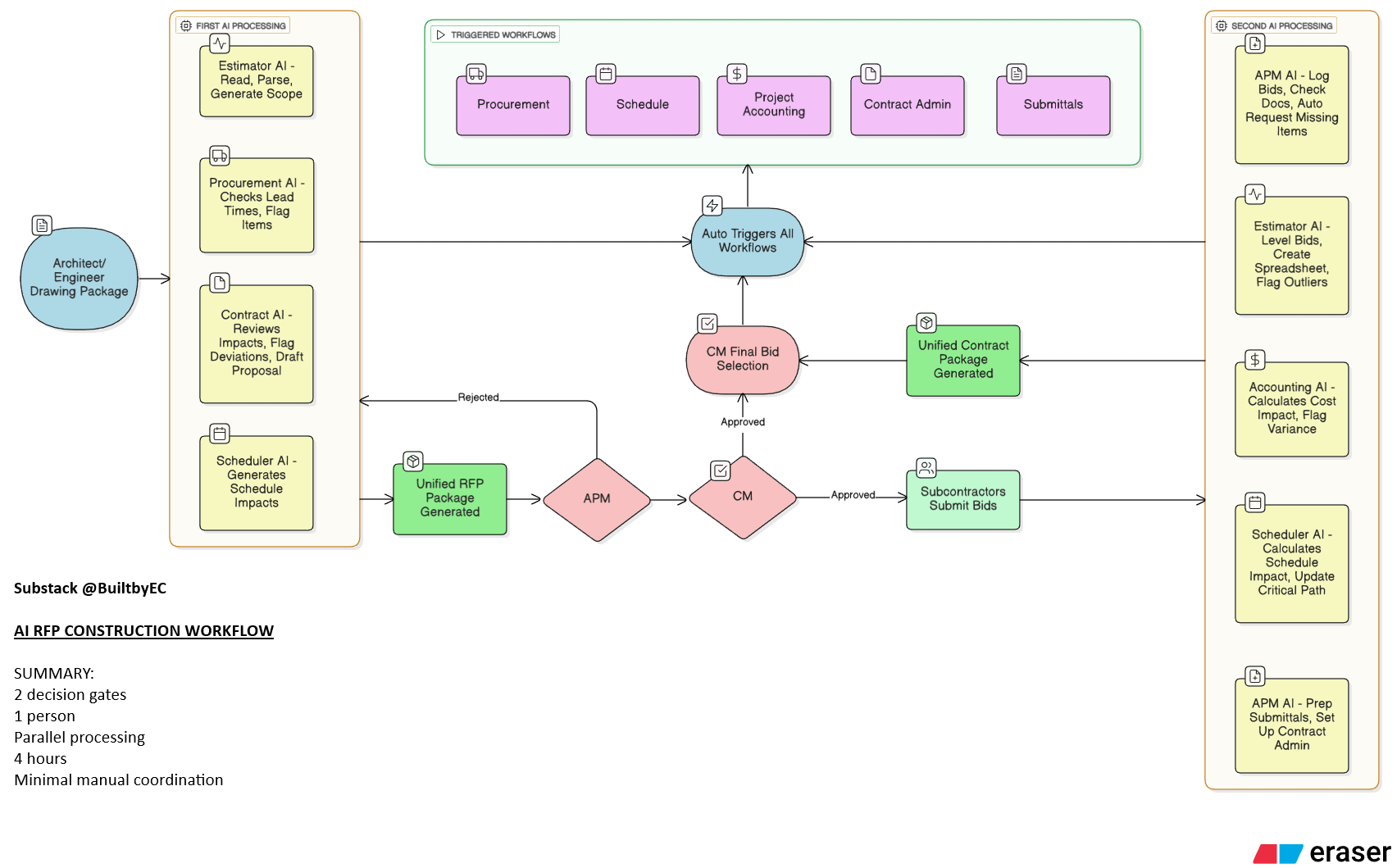
The BuiltbyEC Counter-Strategy: Parallel AI Roles With Central Coordination
I built 5 specialized Claude AI Skills that work together as an integrated construction team. Not one general-purpose AI trying to do everything.
Five distinct roles, each with deep expertise in their domain, all coordinating through a central APM hub.
Here’s the architecture and how my Claude Skills dashboard looks like:
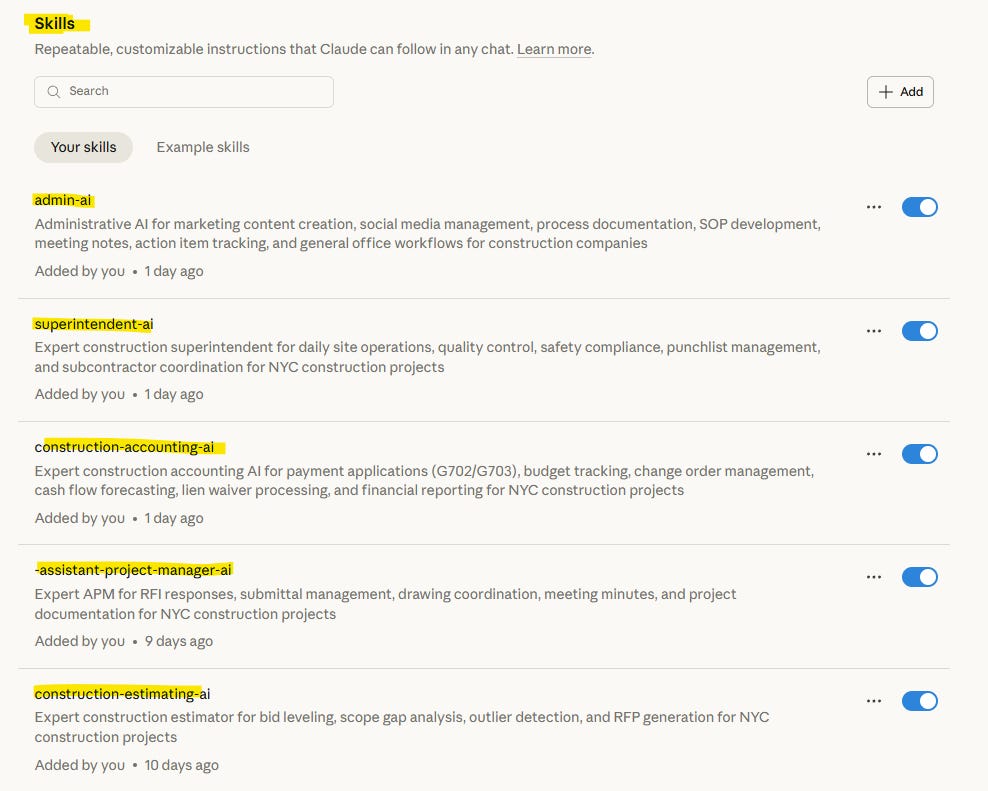
APM AI - Central Coordination Hub (This Is Critical)
The APM AI serves as the project’s central nervous system, logging and tracking all RFIs, submittals, change orders, drawing coordination, and meeting minutes. It cross-references between systems (RFI-001 → PCO-001 → Budget impact), routes information to appropriate team members, tracks response times, and escalates delays.
Estimating AI - Budget Baseline & Cost Intelligence
The Estimating AI generates detailed cost estimates using CSI divisions, maintains unit cost database for bid verification, provides cost breakdowns for change order analysis, and tracks budget variance by trade.
Superintendent AI - Field Operations & Safety
The Superintendent AI documents daily activities (weather, trades, deliveries, issues), tracks safety incidents and near misses, performs quality control inspections, manages punchlist and corrective actions, and maintains three-week lookahead schedules.
Construction Accounting AI - Financial Control & Compliance
The Construction Accounting AI generates AIA G702/G703 payment applications, tracks budget vs. actual with variance analysis, forecasts cash flow by week and trade, processes lien waivers and payment documentation, and shows cumulative change order impacts.
Admin AI - Marketing, Communications & Process Documentation
The Admin AI creates client testimonials and case studies, generates social media content (LinkedIn, X, Instagram), maintains meeting notes with action items, documents SOPs for key workflows, develops email templates for all scenarios, and builds project portfolio materials.
How The Integration Actually Works: Real Example
Let me show you exactly how these 5 AI roles coordinated a project setup for a simple set of interior design drawings for a roof deck renovation.
Here’s the Master Prompt:
Read these drawings.  Keep the outputs as lean as possible to save memory.
Design Team contact (generic): Test@testing.com 555-555-5555 John Doe
Ownership Contact (generic): owner@owners.com 111-111-1111 Jane Smith
Construction manager (me): eric@builtbyec.com 222-222-2222 Eric Chan

Create me a project setup using the APM AI skill as the central arbiter of truth.

Project cost estimate and all templates associated via the estimator AI skill, and APM AI skill setup documents RFI Logs, etc. Create potential RFIs and submittals that will need to be sent for this project, populate the potential PCOs you see.

Using the construction accounting ai and superintendent ai skills, create their respective document templates and coordinate with information that the estimator ai skills and apm ai skills already created.  apm ai should log all changes and be the center of the preconstruction process as the central arbiter of truth.

Use admin ai skill to create project documents for marketing, SOPs, and email templates for this project, coordinate with all prior AI skils.
Watch Claude In Action:
What This Demo Project Revealed About Integrated Documentation
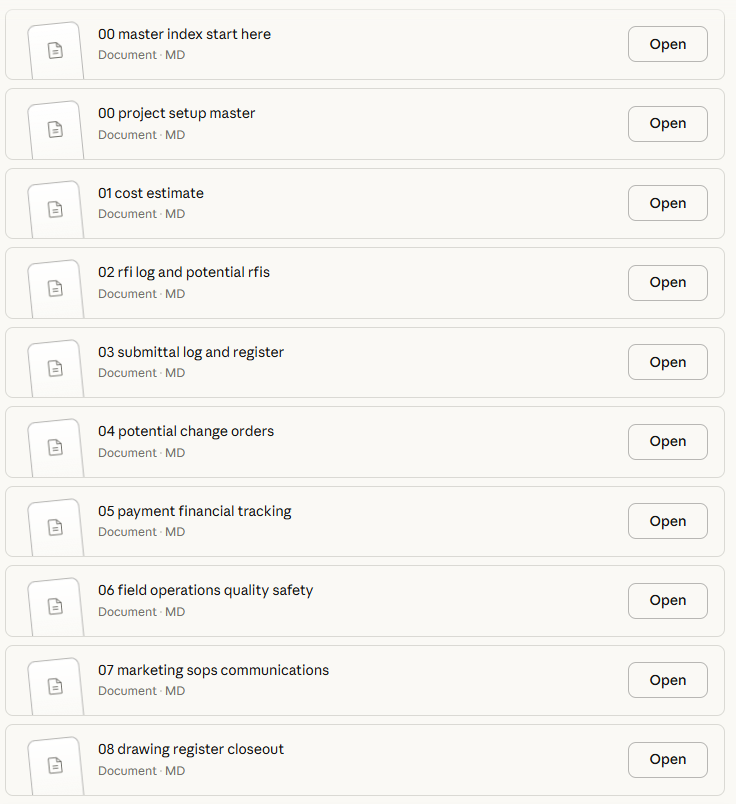
The rooftop renovation was intentionally small (~$176K, 8-12 weeks) to demonstrate the concept without overwhelming complexity. But the patterns that emerged are universal:
Project Setup Master - APM AI central coordination framework, contacts, protocols
Cost Estimate - $176K preliminary budget with detailed CSI breakdown (Estimator AI)
RFI Log & Potential RFIs - 8 anticipated RFIs with proactive solutions
Submittal Register - 12 submittals organized by priority, long-leads flagged
Potential Change Orders - 10 anticipated PCOs with cost estimates (~$35K total)
Payment & Financial Tracking - G702/G703 templates, lien waivers, budget variance
Field Operations & Quality - Daily reports, QC checklists, safety protocols, punchlist
Marketing & Communications - LinkedIn posts, SOPs, email templates
Drawing Register & Closeout - Coordination notes, complete closeout checklist
Why This Matters For Your Projects (Even If They’re 10X Larger)
You might be thinking: “This is a $176K rooftop. My projects are $50M ground-up buildings. How does this scale?”
It scales because the information flows scale, not the document types.
The rooftop project generated:
18 RFIs
18 submittals
10 change orders
45+ daily reports
12 quality inspections
Weekly payment applications
Marketing content
SOPs
Email templates
Your $50M project will generate:
500 RFIs
300 submittals
150 change orders
600 daily reports
200 inspections
24 monthly payment applications
The same marketing content
The same SOPs
The same email templates
The document types are identical. The volume increases. But the coordination complexity increases exponentially if you don’t have integrated systems.
RFI #237 on your project still needs to:
Cross-reference the right submittal
Generate the appropriate change order
Update the budget tracker
Inform field operations
Document in meeting minutes
Support the payment application
Just like RFI-001 on the rooftop project.
The difference: You can’t manually coordinate 500 RFIs. You need the system to do it automatically.
How To Deploy This On Your Projects
I’m sharing the complete SKILL.md files for all 5 AI roles with paid subscribers. These are the exact instructions that create each specialized AI.
Here’s how you use them:
Step 1: Create A Claude Project
Go to claude.ai
Create a new Project for your construction job
Upload your drawings, specs, and contract documents
Step 2: Add The Skills
In Project Settings → Skills
Copy each SKILL.md file content
Create new custom skills for: Estimating AI, APM AI, Superintendent AI, Construction Accounting AI, Admin AI
Step 3: Start With APM As Your Hub
Let APM AI review your documents first
Generate initial RFI log, submittal log, drawing register
Establish the project baseline
Step 4: Bring In Supporting Roles
Have Estimating AI create your budget baseline
Let Superintendent AI set up daily reporting templates
Have Accounting AI prepare payment application format
Let Admin AI draft your communication templates
Step 5: Use Cross-System Prompts
“APM AI, coordinate with Estimating AI to verify this change order cost against our unit cost database”
“Superintendent AI, document today’s concrete pour and notify APM AI of the formwork issue for RFI generation”
“Accounting AI, update the payment application to include PCO-003 that APM AI approved yesterday”
The skills know how to talk to each other because they share the same project context and document formats.
Tips, Tricks, and Limitations
There are still some limitations with the testing I’ve done so far:
The Claude desktop app (and the web app for that matter) has been pretty glitchy when looking at a large amount of drawings or analysis all at once
Tip 1: Prompt the AI in steps. (Estimator AI + APM AI), then Construction Accounting AI + Superintendent AI, then Admin AI
Tip 2: Prompt the AI to “Keep the outputs as lean as possible to save memory.”
Claude Cowork hopefully comes to Windows soon (it was released for MacOS last week), which may allow for large drawing files to be analyzed without uploading. My original plan was to analyze a 9 drawing set for a new construction project but could not upload or pull off of Google Drive without glitching. I hope to test this on a future post to increase the complexity and outputs
Claude can’t access live databases or external systems (yet)
You still need to download and organize the generated documents
Complex calculations may need human verification
Skills work best with complete project documentation uploaded
Each conversation has token limits—break large projects into phases
But what you get is unprecedented speed on document generation with built-in cross-referencing and coordination that prevents information silos.
The rooftop project took me 30 minutes to fully setup document across all 5 systems. Your estimator probably spends 2 hours just on the general conditions section.
Disclaimer: BuiltbyEC is a personal platform focused on sharing high-level construction methodology and strategic principles. This content is for educational purposes only and is not a substitute for professional advice. Always consult with a licensed architect, engineer, or appropriate professional before utilizing any information, principles, or templates provided herein. All views, templates, and content are solely those of Eric Chan and do not represent, endorse, or reflect the views, services, or business operations of any current or past employer or client.
Complete SKILL.md Files
Paid subscribers get immediate access to all 5 complete SKILL.md files.
These files are ready to deploy immediately. No coding required. No complex setup. Just copy the skills into Claude Projects and start generating documentation.
Total value if you hired consultants to build this: $50K+ Your cost as a paid subscriber: $15/month
