
Maxine V2: The After Hours Construction Crew
Using Slack to enhance Google and Claude Cowork for Construction

This Week’s Overview
My solo CM operation has 5 AI agents that work from 1 AM to 7 AM every single night, and the morning brief is sitting in Slack before I’m out of bed.
Slack is not a messaging app. It’s a command deck. Maxine lives there now — intake alerts, morning briefs, and two-way chat, all in one interface your phone already has
The old Gmail stack from my first Maxine Post? Dead. One integration replaced the lot. You can build the same thing this weekend.
If you run your construction business through email inbox zero theater, you are burning roughly 4-6 hours a week that should be going to projects, clients, or sleep.
The 8:47 AM Test
Tuesday. 8:47 AM. I’m on the 2 train heading to a walkthrough.
I open Slack.
One message is waiting in #maxine-brief:
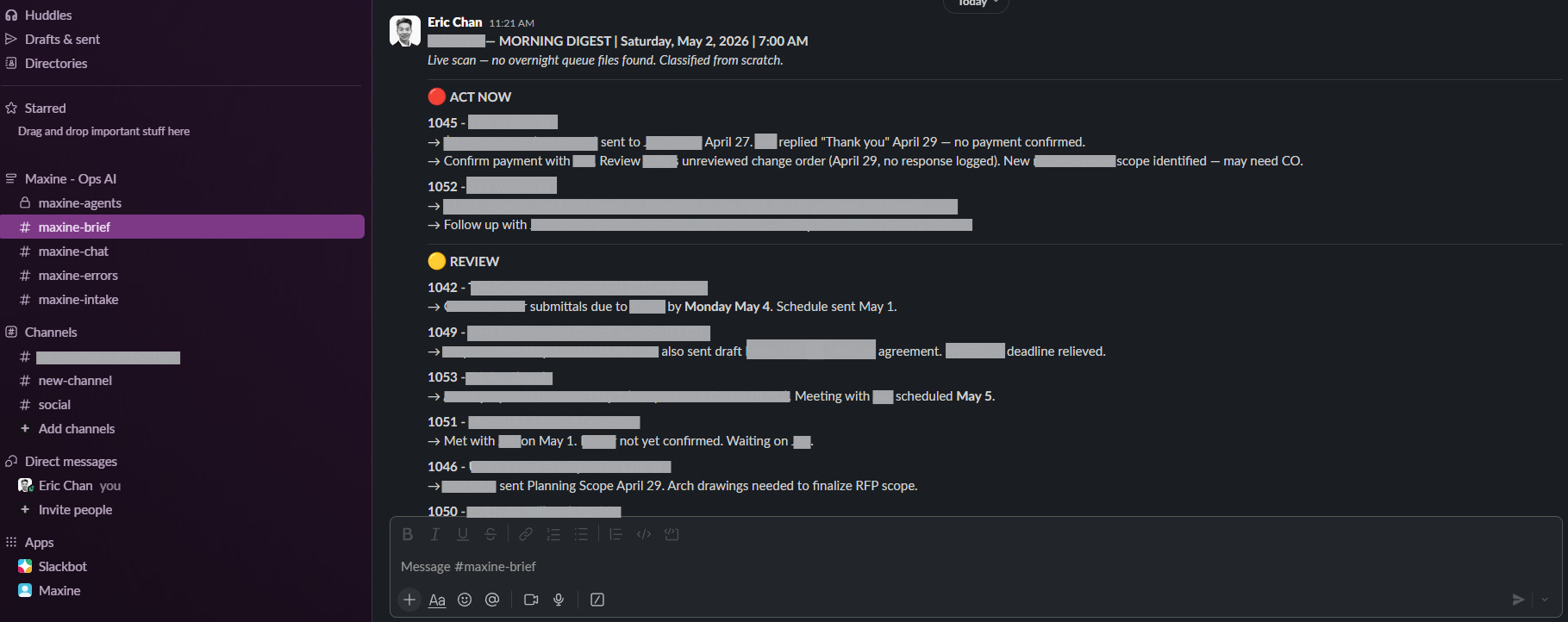
I tapped the pay app link. Flagged the two subs. Sent a chase email.
Total time: 3 minutes. On a subway. Mid-second coffee.
That brief was generated by Claude at 1 AM, cross-referenced against my Gmail at 7 AM, formatted into Slack automatically, and delivered to my pocket. I had zero involvement in making it happen.
This is what Maxine v2 looks like today. Let me show you how the whole thing works — and why my first Maxine post — the one I published in March — is already obsolete.
Why the v1 Stack Died
In the first Maxine post, I showed Maxine v1 — a Gmail workflow where the overnight agent generated emails as drafts in my inbox, and I’d review and send them each morning.
It was based on a Claude Cowork scheduled tasks workflow with the suite of AI Agents I had built. It worked… Barely…
I was getting roughly 70% of the value I wanted, and the ritual of opening Gmail first thing in the morning to triage drafts was becoming its own version of the problem I was trying to solve.
Two failure modes killed it:
Failure mode 1: The delivery layer was fragile. Gmail drafts got buried in my inbox. They sat next to all my other draft emails: subcontractor coordination, vendor correspondence, etc. The signal was drowning in the noise. I built a system to reduce my admin load and increased it instead
Failure mode 2: Nothing talked to itself. The morning brief couldn’t tell the afternoon intake alert what happened overnight. Every handoff was a cold start. The agents didn’t have a shared memory layer or a shared surface.
So I tore it down and rebuilt it with three hard requirements:
One delivery layer. Not my inbox.
One source of truth. Not four spreadsheets.
Zero middleware.
Maxine v2 is the result. And it runs on three things you almost certainly already have if you’re already using Claude.
The Architecture in One View
Before I walk through every piece, here is the whole stack on one canvas.
Capture on the left, Think in the middle, Deliver on the right.
Everything else in this post will zoom-in on this diagram
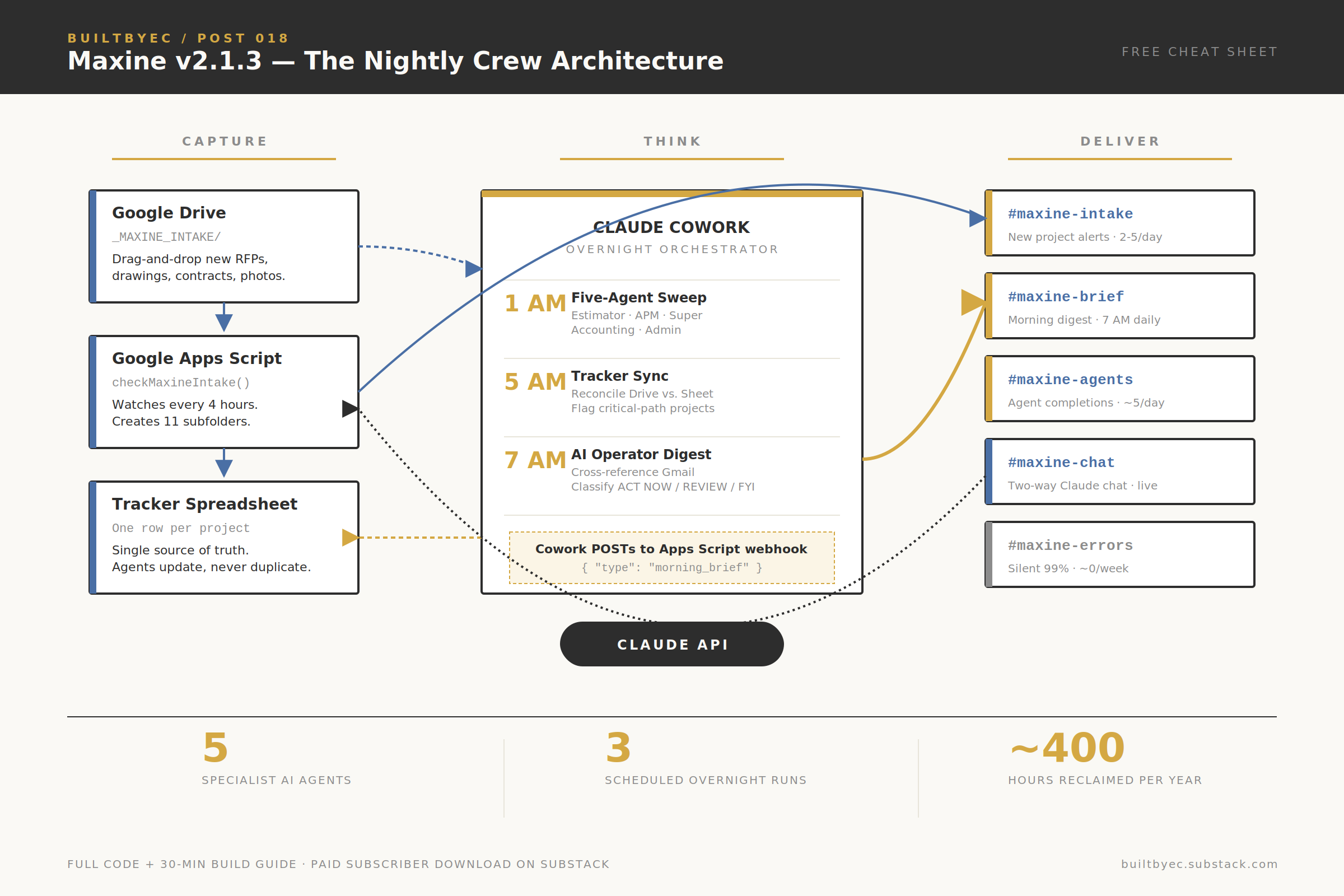
Figure 1 — The Maxine v2 architecture. Capture / Think / Deliver, three overnight runs, five Slack channels.
Why Your Current Admin Stack Is Failing You
Look at how most construction PMs I know operate.
Email for client comms.
Dropbox or Google Drive for files.
Procore, Monday.com, or Excel for tracking.
WhatsApp for subs.
Text threads for the super.
Un-read emails as a to-do list.
A personal spreadsheet with “hot projects” that nobody else sees.
Seven surfaces. Seven places where information decays. Seven places to check every morning before you can even answer the question “what actually needs my attention today?”
Here’s the math I ran on myself in January:
47 minutes a day scanning email for project signals
22 minutes a day cross-referencing project tracker against email threads
18 minutes a day writing status updates to my own notes
14 minutes a day switching contexts between the above
That’s 101 minutes a day. 8.4 hours a week. Over 400 hours a year doing administrative triage that adds zero revenue.
That's mid-five-figures of opportunity cost for me alone. Now multiply: a GC with 4 APMs on the same spiral burns a quarter million dollars annually…
The New and Improved Maxine: One Layer, Three Runs, Five Agents
Maxine v2 is not a tool. It’s a pattern. Here’s the architecture in one paragraph before I explain the pieces.
Google Drive captures. Google Apps Script watches. Claude thinks. Slack delivers. A tracker spreadsheet remembers.
That’s it. Five moving parts, each doing exactly one thing.
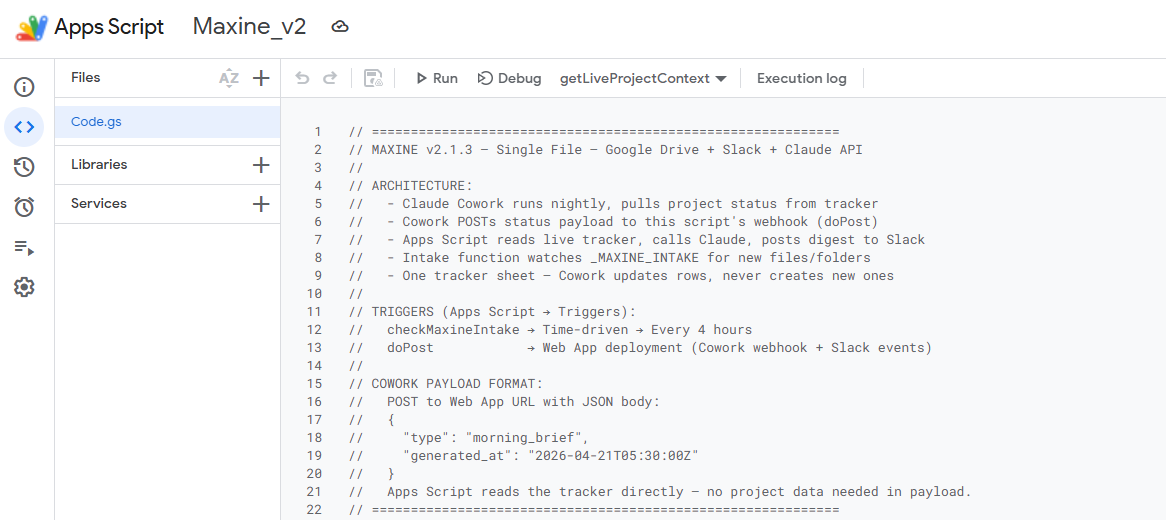
The Three Overnight Runs
The core insight that made this work is separation of concerns. I don’t run “one AI job” at 1 AM. I run three scheduled Cowork sessions, each with a narrow, verifiable scope:
🕐 1:00 AM — Five-Agent Sweep. A chain of five specialist agents activates in sequence: Estimator, APM, Superintendent, Accounting, Admin. Each scans active projects within its lane. Estimator flags bid line items that shifted more than 5% from the prior cycle. APM flags open RFIs over 72 hours. Superintendent reviews site photos and builds the next-day look-ahead. Accounting tracks pay apps due within 7 business days. Admin extracts action items from meeting notes and closes the changelog.
🕔 5:00 AM — Tracker Sync. A reconciliation pass. Any new project folder in Drive gets a new tracker row. Any existing project has its last-activity date refreshed. Any project on critical path gets flagged with a YES in the Critical Path column. One sheet, never duplicated, always current.
🕖 7:00 AM — AI Operator Digest. Maxine herself. She reads the overnight outputs plus a live Gmail scrub, classifies every active project into ACT NOW / REVIEW / FYI / DORMANT, writes the morning digest, and POSTs it to my Apps Script webhook. The digest lands in my Slack #maxine-brief channel by 7:30 AM every single morning.
By the time I’m on the train to a jobsite, the entire state of my firm has been analyzed, classified, and summarized. I don’t read emails to figure out what matters. Maxine tells me.
Why Three Runs Instead of One
If the estimator agent hits a corrupted spreadsheet at 1:02 AM, the tracker sync at 5 AM still runs cleanly. Each job has a bounded scope. If something breaks, I know instantly which run failed — the changelog shows me before I finish my first cup of coffee.
Monolithic AI prompts fail silently. Stepped pipelines fail loudly. Loud failure is a feature, not a bug.
The Slack Command Deck
Here’s what changed between v1 and v2 that nobody is talking about yet: Slack is your command center, not your group chat.
I run five channels. That’s it.
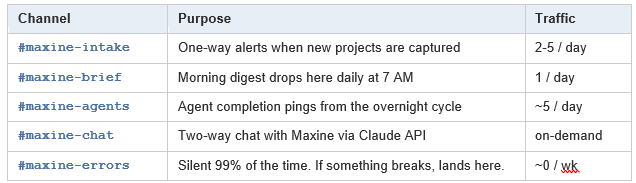
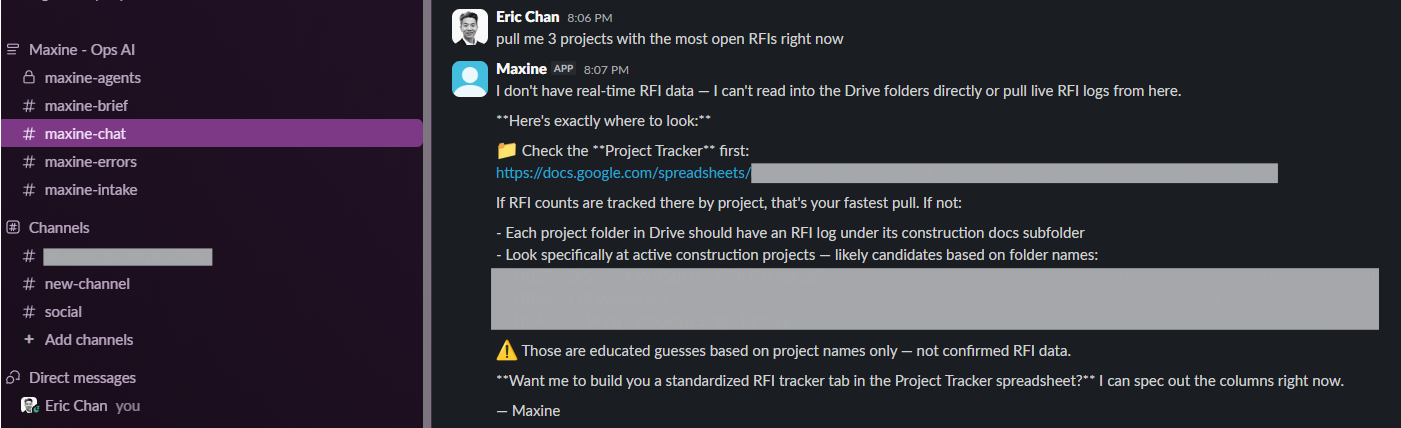
The #maxine-chat channel is in active beta — but it’s already changing how I work.
The goal: I ask Maxine a question like I’m DMing a senior PM. She queries my live Drive folder structure in real time and answers with citations.
Here’s an exchange—a two-way communication—about marking this project as dead after the daily digest incorrectly marked a project as in progress. It remembers and there’s no need to manually change it on the tracker.

And here’s an exchange asking about RFI’s. She doesn’t guess. If she doesn’t know, she tells me exactly which folder to look in.
Intake: The Moment You Close the Loop
Here’s the flow that eliminated about 90% of my project setup overhead.
A new RFP or drawing set lands in my inbox. I drag it to a single Drive folder called _MAXINE_INTAKE. I don’t name anything. I don’t create folders. I don’t fill out a form.
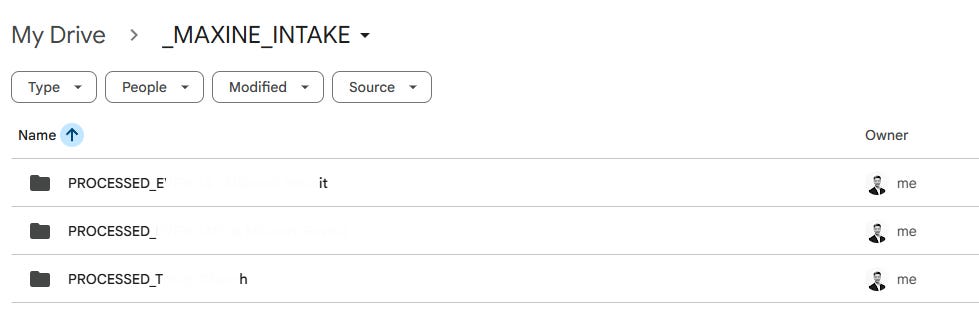
Within 4 hours (my trigger interval), Apps Script sees it. Here’s what happens next — automatically:
Apps Script assigns the next project number in sequence.
It creates a new parent folder: 1047 - [proposal name]
Inside it creates 11 standardized subfolders: 00_Project_Charter, 01_Drawings, 02_Scope_and_Specs, all the way through 10_Closeout.
It routes the source file into the correct subfolder based on keywords in the filename. RFP keywords go to 04_RFP_and_Bids. Drawings go to 01_Drawings. Invoices to … you get it.
It writes a JOB file to my queue folder that tells the overnight agent exactly which specialist agents to run on this project. It notes inside the _MAXINE_INTAKE folder that the files have been processed so there’s no duplicates.
It posts a Slack alert to #maxine-intake: “🏗️ New Project Intake: 1047 - [name]. Agents queued: Estimator, APM. Overnight run tonight.”
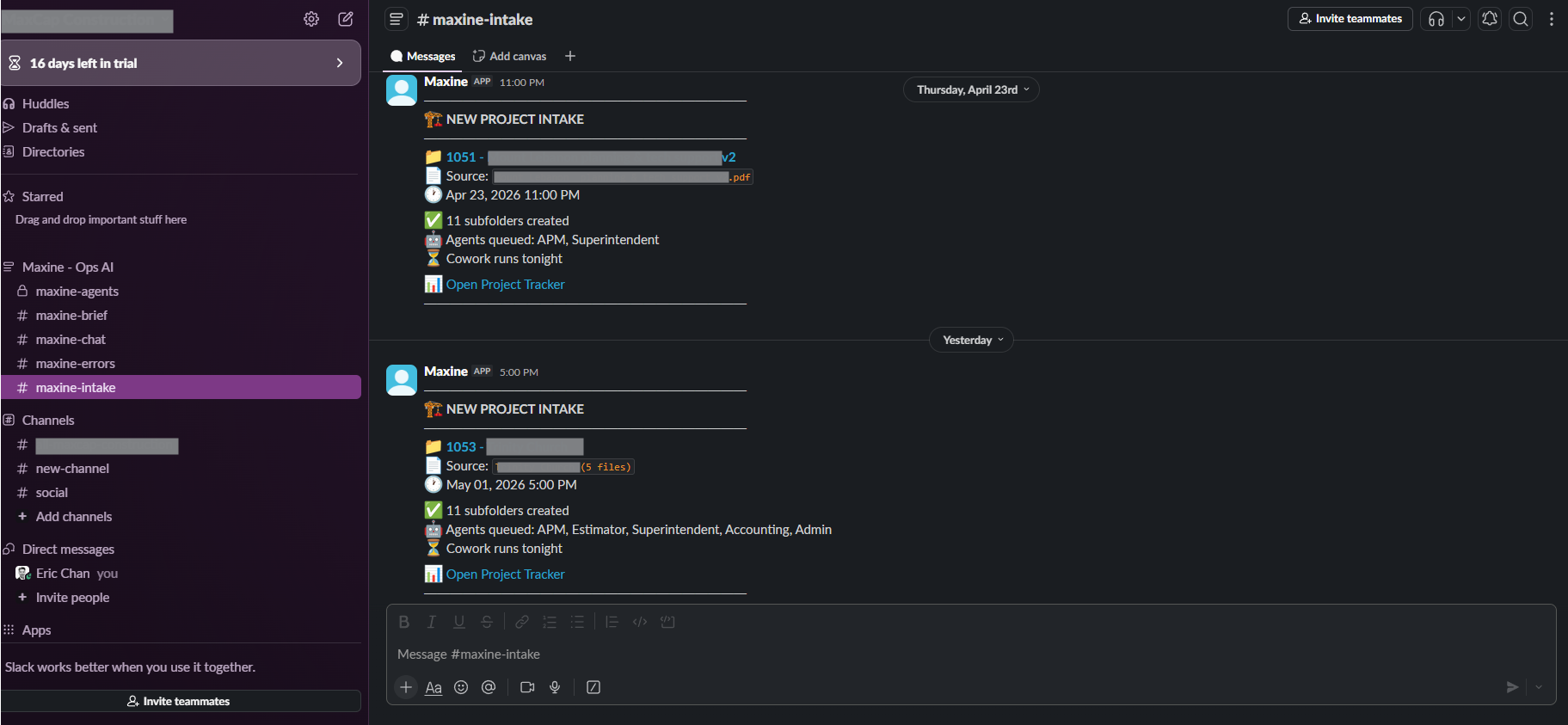
That’s six actions. Zero clicks from me. My entire project setup ritual — the thing that used to take me 20-30 minutes per new project — is now a single drag-and-drop.
Multiply by the 40-50 projects a year. That’s another 15-20 hours back.
The ROI Math That Should Scare You
The average construction PM in NYC costs roughly $145K fully loaded. If admin triage consumes even 20% of their week, that’s $29,000 a year of salary being spent on tab-switching. Per person.
A boutique firm with 4 PMs is burning $116,000 annually on work that a properly wired AI agent can do in 8 minutes.
Scale that to a regional GC with 20 PMs and you’re looking at over half a million dollars of pure margin sitting inside the triage tax.
Now add the soft costs:
RFIs that get missed because they were buried in someone’s inbox
Pay apps that slip past lien waiver deadlines because nobody tracked them
Proposals that sit for 11 days because the PM meant to follow up on Monday
Site photos that get taken but never reviewed, so trend degradation goes unflagged
The industry norm is to hire more APMs to catch what falls through. The systems move is to stop dropping things in the first place.
I can’t hire you more APMs. I can hand you the build guide.
What they don’t tell you about AI in Construction
Here’s something I’ve noticed about how the market reacts to this stuff.
If you tell a GC they need AI, they roll their eyes.
But if you tell them you can save them 400 hours a year by wiring up tools they already pay for — that is a conversation
Maxine is not magic. She’s Slack + Apps Script + Claude API wired together with about 600 lines of JavaScript. The mmagic is in the wiring, and the discipline to keep the architecture small.
The firms who figure this out in 2026 will have a margin advantage of 8-12% over peers who don’t. That’s reclaiming admin hours and redeploying them to client-facing, project-executing work.
You can spend the next six months running around like a 2005 GC with seven open browser tabs. Or you can spend this weekend deploying a system that generates value on Monday morning.
I know which one I’d pick.
Disclaimer: BuiltbyEC is a personal platform focused on sharing high-level construction methodology and strategic principles. This content is for educational purposes only and is not a substitute for professional advice. Always consult with a licensed architect, engineer, or appropriate professional before utilizing any information, principles, or templates provided herein. All views, templates, and content are solely those of Eric Chan and do not represent, endorse, or reflect the views, services, or business operations of any current or past employer or client.
PAID SUBSCRIBER DOWNLOAD
The full Maxine v2 stack below:
